
Laboratory Information System (LIS): Components, Workflow, and Functions
A laboratory information system (LIS) manages patient samples and results from order to report. Learn its components, the pre- to post-analytical workflow, key functions, benefits, and how LIS differs from LIMS.

On this page
Follow a single blood sample through a busy diagnostic lab. It is ordered by a doctor, drawn on the ward, labeled with a barcode, logged in at reception, routed to the right bench, run on an analyzer, checked, released, and finally stored, all while its status is visible to anyone who needs it. The invisible thread tying every one of those steps together is the laboratory information system. Without it, a modern lab running thousands of samples a day would grind to a halt. This article walks through what an LIS is, the parts it is built from, and how a specimen moves through it from order to report.
A laboratory information system (LIS) is software that manages the flow of patient samples and their results through a clinical laboratory, from the moment a test is ordered to the moment the report reaches the doctor. It records patient and sample details, tracks each specimen through testing, captures and verifies results, sends those results to the hospital record, and stores the data for future reference.
In simple terms, the LIS is the lab's central nervous system. Every specimen that enters the lab is registered in it, every result flows through it, and every report leaves through it. In a lab processing thousands of tests a day, the LIS is what makes it possible to know, at any moment, where a sample is and what has been done to it.
LIS is closely related to, and often confused with, LIMS (laboratory information management system). The two overlap and the terms are sometimes used interchangeably, but they have different origins and emphases, which the next section explains.
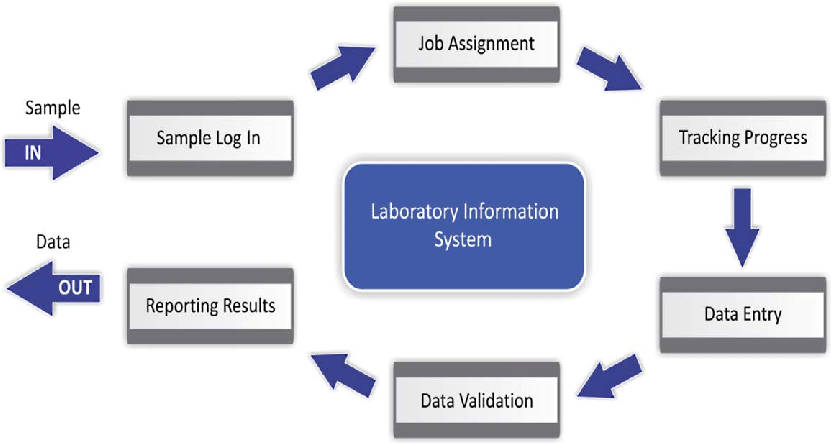 Figure: Overview of laboratory information system workflow
LIS vs LIMS: what is the difference?
LIS and LIMS sound almost identical and are often used interchangeably, but they come from two different worlds.
| Feature | LIS (Laboratory Information System) | LIMS (Laboratory Information Management System) |
|---|---|---|
| Built for | Clinical / diagnostic labs | Research, industrial, QC, and environmental labs |
| Organized around | The patient (results tied to a patient record) | The sample / batch (tracking samples through a process) |
| Typical setting | Hospital and diagnostic laboratories | Pharma, food, water, forensic, and R&D labs |
| Key external link | The hospital record (EHR/HIS), usually via HL7 | Instruments, batches, and study/project data |
| Core question it answers | "What are this patient's results?" | "Where is this sample and what has been done to it?" |
| Regulatory frame | Clinical accreditation (e.g. CAP, ISO 15189) | GLP/GMP, ISO 17025 |
The short version: a LIS is patient-centric and lives in the diagnostic lab that serves a hospital; a LIMS is sample-centric and lives in research, quality-control, and industrial labs. Modern products increasingly blur the line (some clinical systems are marketed as "clinical LIMS"), which is why the terms are muddled in everyday use. For a hospital microbiology or pathology lab, the system in use is almost always described as an LIS.
Components of LIS
The proper functioning of the LIS requires three different components working in a synchronized form. They are:
Tracking Sample
This is the core component, because the specimen is the most valuable item in any clinical laboratory. When a sample arrives, the LIS records its details: a unique accession ID, the patient's name and identifiers, the ward or department, the specimen type, the date and time of collection, and the volume received.
This step of registering a new specimen and assigning it a unique ID is called accessioning, and it is where a physical sample becomes a trackable electronic record. A barcode carrying that ID is printed and attached to the tube, so the sample can be scanned and located at any bench as it moves through the lab. Because one specimen may be tested in several sections, this electronic tracking is what lets the lab know exactly where a sample is and pull every result from it into a single report.
Protocol and workflow control
Another component of LIS is implementing the protocols, steps, processes, and procedures to improve the standard of the laboratory workflow. Similarly, by digitizing all the steps, the system helps generate standard operating procedures (SOP) for processing samples and accurate result interpretation. The SOP helps maintain consistency in sample processing despite different laboratory personnel conducting the tests. Likewise, LIS helps provide a strict protocol for maintaining quality tests and gives visibility based on authorization. LIS also helps generate concise results, send them to the approval queue, and then distribute them as per the requirement.
Managing Storage
Finally, the last component of the LIS is managing sample storage. The samples with the same batch number or date of collection are grouped, which helps in correctly storing the sample for future use. The batch is placed in the same container, box, or shelf rack. Along with the shelf rack, the system tracks the freezer or area where the rack is placed. The storage hierarchy is essential for locating samples quickly in a busy laboratory and keeping the operation organized and efficient.
The overall workflow of LIS
The precise working of LIS has a specific workflow. The overall workflow of LIS is as follows:
Pre-analytical
The pre-analytical workflow of LIS includes:
- Order entry: the requested tests are entered into the LIS when the doctor orders them, creating the electronic record the sample will be matched to.
- Accessioning and barcoding: when the specimen arrives, it is registered in the LIS and given a unique accession ID. A barcode label carrying that ID and the collection details is printed and attached to the tube, so the sample can be scanned and tracked at any bench from this point on.
- Chemical and reagent inventory: It includes checking if the amount of chemicals and reagents required for performing tests are enough in the stock. It also includes confirming the chemicals’ expiry date before using or storing newly purchased chemicals.
Analytical
The analytical workflow of LIS includes:
Worklist assignment: the accessioned sample is assigned to the correct test worklist and bench. (In forensic or medico-legal testing, this is also where a documented chain of custody is maintained, an unbroken record of who handled the sample and when, so the result can stand up in a legal setting.)
Test ordering and instrument interfacing: the LIS sends the test order to the analyzer, telling it which tests to run on which sample, and the analyzer runs the test. Modern analyzers connect directly to the LIS, usually through middleware, so this link is bidirectional: the order goes out and the result comes back electronically, without manual typing, which cuts transcription errors.
Result entry: results flow into the software automatically through the interface, or, for manual methods, are typed in by the technologist once the test finishes.
QC/QA checking: quality-control results for the instruments and reagents are reviewed to confirm the run is valid before patient results are accepted.
Delta check: the LIS compares the patient's new result with their previous result for the same test. A large, unexpected change (a "delta" flag) can signal a mislabeled sample or a genuine clinical change, prompting a review before the result is released.
Autoverification: as the final gate before release, the LIS applies rules that automatically release normal, expected results that have passed all checks, without a person reviewing each one. Results that fall outside the rules (very high, very low, inconsistent, or failing a delta check) are held for a technologist to review. This lets staff focus their attention on the results that actually need judgment.
Post analytical
Finally, the post-analytical workflow includes:
- Reporting the result: once entered and verified, the result is released and distributed. In a hospital, the LIS usually sends the verified result to the electronic health record (EHR) or hospital information system (HIS) through a messaging standard called HL7, so the ordering doctor sees it in the patient's chart. Results may also be printed, made available on a patient portal, or sent to a reference lab, all in a standard format.
- Archiving data/result: It includes recording the patient’s data and result for future references in the software even after distributing it.
Functions of LIS
The functions of LIS are as follows:
- Patient management: It includes determining the admitted department of the patient, the physician assigned to the patient, and the type of specimen required from the patient.
- Tracking patient data: LIS helps track patients’ demographic and laboratory data (laboratory results). Also, it helps in monitoring the status of sample processing. In case of readmission, it helps in retrieving the historical information of the patient so that the laboratory personnel and the hospital staff can choose the right path to provide care.
- Consistency and accuracy in generating results: Since LIS helps standardize laboratory protocols and verify the results, it helps maintain consistent results for each patient. Likewise, the accuracy of the testing is verified and rechecked by authorized personnel.
- Quality assurance: LIS not only helps in standard laboratory workflow but also helps maintain the quality of the tests in the laboratory. The LIS records data of every quality testing which helps generate any instrument’s health status report.
- Billing and charge capture: the LIS links each test performed to the patient's account, so charges are captured automatically as tests are ordered and completed. This reduces missed charges and billing errors, and gives an accurate, itemized record of the services provided.
Benefits of LIS
The benefits of LIS are broadly classified into two groups. They are:
Benefits to the patient
- Firstly, the patient will know the status of their laboratory test.
- The results are available in digital as well as paper format.
- It decreases the risk of duplicating the collection of samples because the processing and storing of the samples are well managed.
- Shorter stay in the hospital/clinic due to digitalization and organized way of getting results.
Benefits to the laboratory personnel
- It increases productivity due to a well-managed laboratory as well as inventory.
- It decreases miscommunication between staff during change of shift about the procedures already carried out or needed to be performed because the results, as well as the tests, are digitized.
- Likewise it makes obtaining the details of the patients like samples required/already used, and status of patients like the department they are situated in, their health conditions easier. These data help in eliminating false results during diagnosis.
- It also helps obtain a history of a patient so that the right treatment can be given to the patient.
- It also helps in forming a confirmed and concise report in a single file of a single patient.
- Staff spend less time on manual data handling, freeing them for skilled bench work because the laboratory’s samples and inventory management becomes easy after using the software.
Criteria for Choosing LIS
Choosing the perfect LIS for your laboratory depends on four main characteristics. They are:
Its speed
A good LIS has a rapid response time, so screens and records load quickly even under heavy use. Its speed depends on both the storage/hardware behind it and the design of the application software. Firstly, enhancing the speed of LIS depends on the design/outlay of the application like an on-screen help menu, data attributes, and on-screen navigation. Another factor, the storage capacity, depends on the efficiency of the storage disk and retrieval of the stored data.
Its connectivity
Connectivity of LIS means how easily one can access the data from different departments of hospitals like a laboratory, patient’s room, hospital floor, clinics, or doctor’s office. Connectivity to the available network of the laboratory is also very crucial. The LIS connects to the lab's network and to the hospital information system, along with printers, analyzers, and other components of the laboratory computer system. When the network is well designed, adding a new computer or instrument, or upgrading the LIS, becomes much easier. So during the selection of LIS, one should also consider the type of hospital information system (HIS) used.
How adaptable it is
The need for laboratories like new instruments and rotation of laboratory staff keeps changing from time to time. So, LIS needs to be the most adaptable to any change. Similarly, the LIS should be able to modify as per the time requirement.
How reliable it is
The LIS should be reliable in such a way that the software functions without interference or constant maintenance. The downtime in any reliable LIS is very low. The disk mirroring and real-time backup of the LIS software determines its reliability.
How to Remember
LIS = the lab's nervous system, order to report. If you remember one thing, remember that the LIS carries a sample's whole journey from the doctor's order to the final report. Every other feature hangs off that thread.
The workflow follows the three analytical phases. Pre-analytical (order, accession, barcode), analytical (test, interface, verify), post-analytical (report via HL7, archive). This is the same pre/analytical/post framework used for lab errors and quality, so it doubles as a memory scaffold you already know.
LIS is patient-centric; LIMS is sample-centric. The one-line distinction. A clinical diagnostic lab uses an LIS built around the patient record; a research or QC lab uses a LIMS built around the sample/batch. Patient vs. sample is the whole difference in three words.
Autoverification = the LIS handles the normal, humans handle the abnormal. The point of autoverification is to free staff from checking routine normal results so they can focus on the ones that need judgment. "Auto-release the normal, flag the strange."
Key exam facts
| Point | Fact | Memory aid |
|---|---|---|
| What LIS is | Software managing patient samples and results, order to report | The lab's nervous system |
| LIS vs LIMS | LIS = patient-centric (clinical); LIMS = sample-centric (research/QC) | Patient vs sample |
| Three components | Sample tracking, protocol/workflow control, storage management | Track, control, store |
| Accessioning | Registering a new specimen and assigning its unique ID | Where sample becomes record |
| Workflow phases | Pre-analytical, analytical, post-analytical | Same as lab-error phases |
| Instrument interfacing | Analyzers send results to LIS electronically (bidirectional, via middleware) | No manual typing |
| Autoverification | Rules auto-release normal results; abnormal held for review | Auto-release normal, flag strange |
| Delta check | Compares new result with patient's previous result; flags big changes | Catch mislabeled samples |
| HL7 | Standard used to send results to the EHR/HIS | The language LIS speaks to the EHR |
| Key benefit | Fewer transcription errors; full traceability of every sample | Right result, tracked end to end |
| Billing function | Links tests to patient account for automatic charge capture | Charge capture, not free service |
Where Students Get Confused
"What is the difference between LIS and LIMS?" An LIS is patient-centric and used in clinical diagnostic labs; results are tied to a patient record and sent to the hospital system. A LIMS is sample-centric and used in research, QC, and industrial labs; it tracks samples and batches through a process. The terms are often used interchangeably because modern products blur the line, but the origin and emphasis differ: patient versus sample.
"What does accessioning mean?" Accessioning is the step where a specimen arriving in the lab is registered in the LIS and given a unique ID (an accession number). It is the moment a physical tube becomes a trackable electronic record, and every later step refers back to that ID.
"What is autoverification, and is it safe?" Autoverification is a set of rules in the LIS that automatically release results which are normal and pass all checks, without a person reviewing each one. It is safe because results that fall outside the rules (abnormal, inconsistent, or failing a delta check) are held for a human to review. It speeds up routine reporting while keeping judgment on the results that need it.
"How does the LIS talk to the hospital's system?" Usually through a messaging standard called HL7. When a result is verified in the LIS, an HL7 message carries it to the electronic health record or hospital information system, so the ordering doctor sees it in the patient's chart. HL7 is the shared language that lets separate systems exchange lab data.
"Is the LIS the same as the analyzer or the middleware?" No. The analyzer is the instrument that runs the test; the middleware is a layer that sits between analyzers and the LIS, handling result flow and some rules; the LIS is the overall system that manages the sample, the patient record, and the report. They work together but are different layers.
Frequently Asked Questions
What is a laboratory information system (LIS)?
What is a laboratory information system (LIS)?
A laboratory information system is software that manages patient samples and their results in a clinical laboratory, from the moment a test is ordered to the final report. It records sample and patient details, tracks specimens through testing, captures and verifies results, sends them to the hospital record, and stores the data.
What is the difference between LIS and LIMS?
What is the difference between LIS and LIMS?
An LIS is patient-centric and used in clinical diagnostic labs, with results tied to a patient record. A LIMS is sample-centric and used in research, QC, and industrial labs, tracking samples and batches through a process. The terms are often used interchangeably, but that patient-versus-sample focus is the core difference.
What are the main components of an LIS?
What are the main components of an LIS?
Three core components: sample tracking (accessioning and barcoding specimens), protocol and workflow control (standardizing how tests are done and results verified), and storage management (organizing retained samples for retrieval). Together they let the lab know where every sample is and what has been done to it.
What is the workflow of an LIS?
What is the workflow of an LIS?
It follows the three analytical phases. Pre-analytical: order entry, accessioning, and barcoding. Analytical: assigning the test, interfacing with analyzers, entering and verifying results, and quality control. Post-analytical: releasing the report (usually to the EHR via HL7) and archiving the data.
What is autoverification in an LIS?
What is autoverification in an LIS?
Autoverification is a set of rules that automatically release results which are normal and pass all checks, without a person reviewing each one. Abnormal or inconsistent results are held for a technologist to review, so staff focus on the results that need human judgment.
What are the benefits of an LIS?
What are the benefits of an LIS?
It reduces transcription errors, gives full traceability of every sample, speeds up reporting, links results to the patient record, standardizes workflow and quality control, and captures billing accurately. For patients, it means faster, more reliable results; for lab staff, less manual work and clearer handovers between shifts.
References
- Forest JC, Rheault C, Dang-Vu T. The laboratory information system (LIS): I. Application to the clinical chemistry laboratory. Clin Biochem. 1985;18(2):78-84. https://doi.org/10.1016/s0009-9120(85)80085-0
- College of American Pathologists (CAP). Laboratory Accreditation Program: information systems and interface requirements. Northfield (IL): CAP. Available from: https://www.cap.org
- Clinical and Laboratory Standards Institute (CLSI). AUTO10: Autoverification of Medical Laboratory Results for Specific Disciplines. Wayne (PA): CLSI.
- Health Level Seven International (HL7). About HL7 and clinical data interoperability standards. Available from: https://www.hl7.org
- Sepulveda JL, Young DS. The ideal laboratory information system. Arch Pathol Lab Med. 2013;137(8):1129-1140. https://doi.org/10.5858/arpa.2012-0362-RA
- International Organization for Standardization. ISO 15189: Medical laboratories: Requirements for quality and competence. Geneva: ISO.

Tankeshwar Acharya, MSc (Medical Microbiology)
Tankeshwar Acharya is an Assistant Professor in the Department of Microbiology at Patan Academy of Health Sciences (PAHS), Nepal, where he has been teaching and practicing clinical microbiology for over 14 years. He is the founder of Microbe Online, one of the leading free microbiology education resources on the web, covering bacteriology, mycology, parasitology, immunology, and clinical laboratory diagnostics written from direct experience in both the classroom and the diagnostic laboratory.
Comments
No comments yet. Be the first to share your thoughts.
Leave a comment
All comments are reviewed before they appear.